General
A small business marketing workflow is a connected set of repeatable, automated processes designed to generate and convert leads efficiently while freeing up your time. 82% of marketers report improved team alignment and clearer business impact when they operate from a structured marketing strategy. That figure tells you something direct: without a defined workflow, you are competing on effort alone. Tools like HubSpot, Canva, and AI automation systems have made it possible for small teams to run marketing at a scale that once required entire departments. The payoff compounds over time, but only if the system is built correctly from the start.
What tools and prerequisites do you need for an effective small business marketing workflow?
The right foundation prevents wasted effort later. Small businesses succeed most when they start with a lightweight plan that clearly defines positioning, audience, and channel priorities before touching any software. Skipping this step means your automation amplifies the wrong messages to the wrong people.
Before selecting tools, define three things: your primary business goal, your ideal customer profile, and the one or two channels where your audience already spends time. These decisions shape every tool choice that follows.

| Tool category | Example platforms | Primary function |
|---|---|---|
| CRM | HubSpot, Zoho CRM | Contact management and lead tracking |
| Design | Canva, Adobe Express | Brand asset creation |
| Email automation | Mailchimp, ActiveCampaign | Sequenced email sends |
| SEO and content | Semrush, Surfer SEO | Keyword research and content briefs |
| Social scheduling | Buffer, Hootsuite | Planned post distribution |
| AI writing assistance | Claude, ChatGPT | Draft generation and copy iteration |
Clean data is the most underrated prerequisite. A CRM full of duplicate contacts or outdated email addresses will corrupt every automated sequence you build. Audit your contact list before connecting it to any automation platform.
AI integration adds real speed, but it requires guardrails from day one. Agentic AI automation where AI directly edits CRM records or sends emails without review risks data errors that are difficult to reverse. Set all CRM write actions and email sends to “needs approval” until you have tested each workflow thoroughly.
Pro Tip: Connect your tools through a platform like Zapier or Make before you build any workflow. Confirming that your CRM, email tool, and design platform can pass data between each other saves hours of troubleshooting later.
How do you build connected workflows across brand, content, SEO, email, and ads?
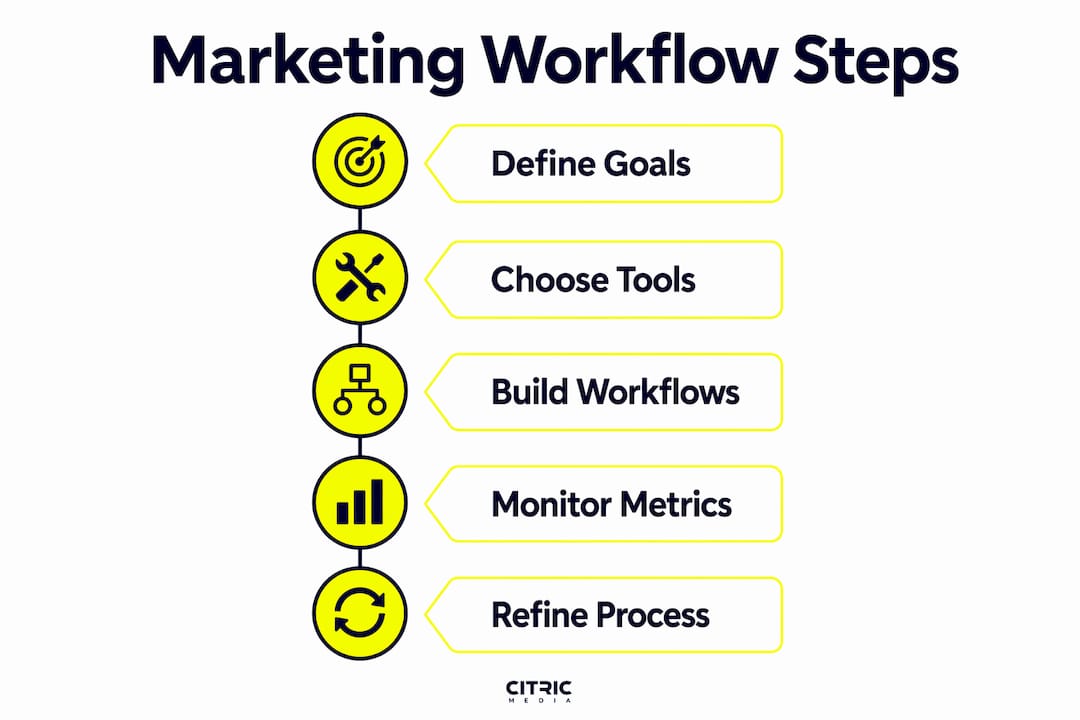
An AI marketing system comprises five connected workflows: brand, content, SEO, email, and ads. Each workflow has its own tools, triggers, and weekly routines. Together they form a system where output from one workflow feeds directly into the next.
- Brand workflow. Define your visual identity in Canva using brand kits: logo, colour palette, and typography. Store approved templates centrally so every piece of content stays consistent without manual checking.
- Content workflow. Use a tool like Semrush or Surfer SEO to generate a monthly content brief. Feed that brief to an AI writing assistant such as Claude or ChatGPT to produce first drafts. A human editor reviews and publishes.
- SEO workflow. Track target keywords weekly. When a page drops in ranking, trigger a content refresh task automatically using a project management tool like Asana or Trello. Link your Google Search Console data to your CRM for a full picture of organic lead quality.
- Email workflow. Build sequences in Mailchimp or ActiveCampaign triggered by specific contact actions: a form submission, a product page visit, or a downloaded guide. Effective automation eliminates at least 4 manual steps daily by connecting website forms, CRMs, and scheduling tools.
- Ads workflow. Set up Google Ads or paid social campaigns with automated rules: pause underperforming ads when cost per click exceeds a set threshold, and increase budget on ads that hit a target return. Link ad conversions back to your CRM to close the attribution loop.
| Workflow | Weekly time input | Key output |
|---|---|---|
| Brand | 30 minutes | Approved asset templates |
| Content | 2 hours | 2–4 published or scheduled pieces |
| SEO | 45 minutes | Keyword report and refresh tasks |
| 1 hour | Active sequences and performance review | |
| Ads | 1 hour | Optimised campaigns with updated rules |
Building a full AI marketing system takes approximately 5 weeks with around 5 hours per week of ongoing maintenance once live. That is a realistic commitment for a small team, and the return grows as each workflow matures.
Pro Tip: Schedule a fixed 90-minute block each week to review all five workflows together. Treating them as one system rather than five separate tasks reveals connections you would otherwise miss, such as a drop in email open rates that traces back to a change in your ad targeting.
What best practices keep your marketing workflow running without errors?
Marketing workflows must connect campaign goals, activities, and budget allocations to measurable business outcomes. Without that connection, you cannot tell whether a slow sales period is a workflow problem or a market problem.
The single most important safety measure is the human approval step. Keeping human review in the loop prevents costly errors even when using advanced AI tools. Apply this rule to any action that writes to your CRM, sends an email to a live list, or publishes content publicly.
Practical checkpoints to build into every workflow:
- Review all AI-generated copy before it enters a live email sequence.
- Set a weekly KPI check covering open rates, click rates, cost per lead, and organic traffic.
- Use a staging environment for CRM changes before applying them to your full contact database.
- Assign one person as workflow owner for each of the five areas. Shared ownership usually means no ownership.
- Document every trigger and action in a shared log so the whole team understands what fires automatically.
“Inconsistent marketing campaign outcomes often come from a lack of clear strategic connections between activities, channels, and budgets.” — Monday.com, 2026
When sales slow unexpectedly, automating targeted campaigns that identify slow revenue windows, draft campaigns, generate assets, and stage sends for review gives you a structured response rather than a reactive one. This is where a well-documented workflow pays back its setup cost in full.
You can track campaign performance metrics at the workflow level to see which of the five systems is underperforming and adjust resources accordingly.
How do you scale and refine your workflows for ongoing growth?
A marketing workflow is not a one-time build. The businesses that get the most from automation treat their workflows as living documents that evolve with their audience and market.
Start by adding one new channel or campaign type per quarter rather than rebuilding everything at once. This keeps the system stable while expanding its reach. For example, after your email workflow is running reliably, add a retargeting ad sequence in Meta Ads Manager that triggers when a contact opens three emails but does not convert.
Key practices for scaling without losing control:
- Use AI tools to analyse campaign data monthly and surface patterns you would not spot manually, such as which content topics generate the highest-quality leads.
- Build a feedback workflow: when a lead closes or a deal is lost, tag the contact in your CRM with the reason. Over time, this data reshapes your content and ad targeting.
- Review your lead generation approach every six months against your original audience personas. Audiences shift, and workflows built on outdated assumptions produce diminishing returns.
- Keep a workflow changelog. Every time you change a trigger, update a sequence, or add a new integration, log it with a date and reason. This makes troubleshooting far faster.
- Bring in new AI capabilities incrementally. Test a new tool in one workflow before rolling it across all five.
Pro Tip: Run a quarterly “workflow audit” where you trace one lead from first touch to closed sale through every automated step. This end-to-end view reveals gaps that individual workflow reviews miss entirely.
Structured documentation is the difference between a workflow that scales and one that breaks when a team member leaves. Write down every process, even the ones that feel obvious. The goal is a system that any competent person can operate, not one that lives in one person’s head.
For broader digital marketing guidance for SMEs, the principles of clear positioning and measurable channel priorities apply at every stage of growth.
Key takeaways
A well-built small business marketing workflow connects brand, content, SEO, email, and advertising into one system that generates leads and converts them with minimal manual effort.
| Point | Details |
|---|---|
| Define goals before tools | Set your audience, positioning, and channel priorities before selecting any software. |
| Use five connected workflows | Brand, content, SEO, email, and ads each need their own tools, triggers, and weekly routines. |
| Keep humans in the approval loop | Set CRM edits and email sends to “needs approval” to prevent automation errors. |
| Measure at the workflow level | Track KPIs per workflow to identify which system is underperforming and fix it directly. |
| Scale one channel at a time | Add new campaign types quarterly to grow the system without destabilising what already works. |
My blunt view on where most small businesses go wrong
Most small business owners I speak with make the same mistake: they buy the tools before they have a strategy. HubSpot, Mailchimp, and Canva are all excellent platforms, but they cannot compensate for a missing audience definition or an unclear value proposition. The workflow becomes a very expensive way to send the wrong message faster.
The second mistake is trusting AI automation too early. I have seen businesses hand full CRM write access to an AI agent in week one, only to spend weeks cleaning up duplicate records and misfired email sequences. The human-in-the-loop rule is not a temporary precaution. It is a permanent feature of any well-run system.
What actually works is building incrementally. Start with one workflow, usually email, because the feedback loop is fast and the damage from errors is contained. Get that right, measure it properly, then connect the next workflow. Within three months you have a system that compounds. Within six months it is doing work that would have taken a full-time hire.
The businesses that treat their workflow as a product, something to be tested, iterated, and documented, consistently outperform those that treat it as a one-time project. That shift in mindset is worth more than any individual tool choice.
— Martin
How Citricmedia helps you build a marketing workflow that delivers
Citricmedia has spent over 27 years helping UK small businesses turn fragmented marketing activity into connected, performance-driven systems. Whether you need Google Ads campaigns wired into a CRM, an SEO programme that feeds your content workflow, or paid social campaigns that close the loop on your email sequences, the team brings the technical depth and strategic clarity to make it work. If you are ready to stop managing marketing tasks manually and start running a system that generates leads consistently, explore Citricmedia’s digital solutions and find out how we can build it with you.
FAQ
What is a small business marketing workflow?
A small business marketing workflow is a connected set of repeatable processes covering brand, content, SEO, email, and advertising that work together to generate and convert leads. When automated correctly, it reduces manual tasks and keeps marketing output consistent.
How long does it take to build a marketing workflow?
Building a full AI marketing system takes approximately 5 weeks with around 5 hours per week of ongoing maintenance once it is live. Starting with a single workflow, such as email, reduces the initial time commitment significantly.
What tools do small businesses need for marketing automation?
The core stack covers a CRM such as HubSpot or Zoho, an email platform such as Mailchimp or ActiveCampaign, a design tool such as Canva, and an AI writing assistant such as Claude or ChatGPT. Connect them through an integration platform like Zapier to pass data automatically between systems.
How do you prevent errors in automated marketing workflows?
Set all CRM write actions and email sends to “needs approval” before any automation goes live. Review AI-generated content before it enters a live sequence, and assign one person as owner for each workflow area.
How do you measure whether a marketing workflow is working?
Track open rates, click rates, cost per lead, and organic traffic at the workflow level each week. Linking campaign actions to measurable business outcomes is the only reliable way to identify which part of your system needs attention.