Social Media
Facebook ads, managed through Meta Ads Manager, are the most direct paid social route to generating business leads at scale. Running them facebook ads step by step means choosing the right campaign objective, building a precise audience, setting a tested budget, and publishing creative that converts. The typical cost-per-click for Facebook ads ranges between $0.50 and $2.00, depending on industry and competitive demand. That range matters because it tells you Facebook advertising is accessible to UK SMEs, not just large brands with deep pockets. Get the structure right from the start, and the platform’s algorithm does a significant amount of the heavy lifting for you.
What do you need before launching a Facebook ad campaign?
Every successful Facebook ad campaign starts well before you open Meta Ads Manager. Missing a single prerequisite can delay your launch or produce unreliable data from day one.
The four things you need in place:
- A Facebook Business Page. Your ads run from a Page, not a personal profile. If you do not have one, create it first at business.facebook.com.
- A Meta Business Manager account. This is the administrative layer that connects your Page, ad account, and team members. It also protects your business assets if a personal account is ever compromised.
- The Meta Pixel and Conversions API. Installing these correctly is critical for tracking lead actions and feeding the algorithm accurate data. Without them, you are flying blind on attribution.
- Creative assets and copy. Gather your images or video clips, headline options, and body copy before you open Ads Manager. Trying to write copy inside the platform wastes time and produces weaker results.
Pro Tip: Install the Meta Pixel via Google Tag Manager if your website supports it. This avoids the need to touch your site’s code directly and makes future tracking changes far quicker.
| Asset | Why you need it | Where to set it up |
|---|---|---|
| Facebook Business Page | Required to run any ad | business.facebook.com |
| Meta Business Manager | Manages accounts and permissions | business.facebook.com |
| Meta Pixel | Tracks on-site lead actions | Events Manager in Meta |
| Conversions API | Server-side tracking for accuracy | Events Manager in Meta |
| Creative assets | Images, video, copy for your ads | Prepared in advance |
A social media ad workflow that maps these assets before campaign launch saves hours and prevents the most common beginner errors.
How do you create a Facebook ad campaign step by step using Meta Ads Manager?
Meta Ads Manager is the central tool for running Facebook, Instagram, and Audience Network ads. It provides full targeting and optimisation controls that the simple Boost Post button cannot match. Every serious lead generation campaign belongs here.
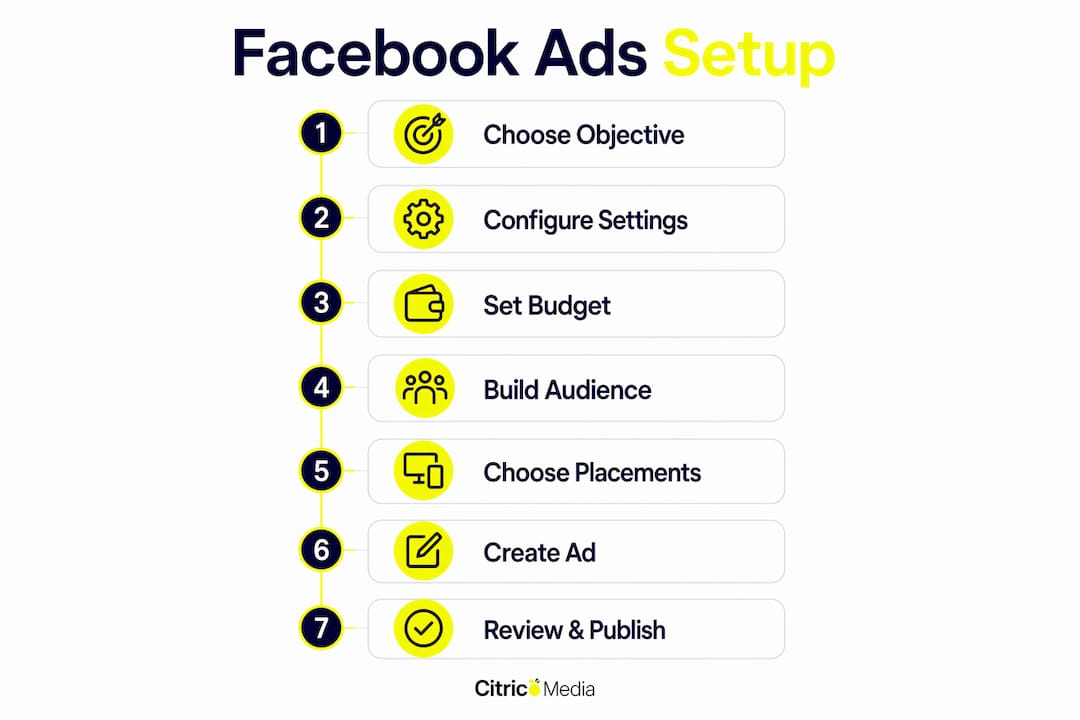
Step 1: Choose your campaign objective
Open Meta Ads Manager and click “Create.” You will see a list of campaign objectives. For lead generation, select either Leads or Sales. Choosing the right objective is the single most important decision in the setup process. Meta’s algorithm targets users most likely to take the action that matches your objective. Choosing “Traffic” instead of “Leads” will drive clicks to your website but not necessarily enquiries.
Step 2: Configure campaign settings
Name your campaign clearly, for example “Brand Name | Leads | UK | June 2026.” Check whether your ads fall under a special ad category such as housing, employment, or credit. If they do, you must declare this. Enable Campaign Budget Optimisation (CBO) at this stage. CBO automatically distributes your budget across ad sets to maximise results, removing the need to manually balance spend.

Step 3: Set your budget
Budget is where most beginners underinvest during testing. Start with a daily budget of £10 to £20 per ad set to collect meaningful data. Spending less than this produces results too slowly to make informed decisions. A lifetime budget works well for campaigns with a fixed end date, such as a promotional offer. A daily budget suits always-on lead generation.
Step 4: Build your audience
This is where you define who sees your ads. Meta offers three main audience types:
- Core audiences: Built from demographics, interests, and behaviours. Useful for reaching new prospects.
- Custom audiences: Built from your own data, such as website visitors tracked by the Pixel, email lists, or video viewers.
- Lookalike audiences: Meta finds users who resemble your best existing customers. These typically outperform cold interest-based audiences once you have enough source data.
For UK lead generation, start with a core audience filtered by location (UK or specific regions), age range, and two or three relevant interests. Keep your audience size between 500,000 and 2,000,000 for a balanced reach-to-relevance ratio.
Step 5: Choose your placements
Select Advantage+ placements unless you have a specific reason to restrict where your ads appear. Advantage+ placements allow Meta to automatically serve your ads across Facebook, Instagram, Messenger, and the Audience Network for the best algorithmic performance. Manual placements make sense only when your creative is built exclusively for one format, such as a vertical video designed purely for Instagram Stories.
Step 6: Create your ad
Choose your ad format: single image, carousel, or video. For lead generation, the Lead Ad format keeps users on Facebook and pre-fills their contact details, which reduces friction significantly. If you prefer to send users to a landing page, use a single image or video with a strong call to action.
Write your copy using the Hook-Body-Close framework. The hook grabs attention in the first line. The body explains the benefit. The close tells the reader exactly what to do next. The first 2–3 seconds of a video ad are critical to capturing attention, so lead with your strongest visual or statement.
Step 7: Review and publish
Check every element: headline, body copy, image or video, destination URL, and pixel event. Then click Publish. Meta typically approves new campaigns within 24 hours, with most reviewed within a few hours. Do not edit a live ad during the learning phase, which lasts roughly 50 optimisation events, as changes reset the algorithm’s learning.
How do you monitor and optimise Facebook ads for better results?
Publishing your campaign is the beginning, not the end. Performance data tells you what to keep, what to cut, and where to invest more.
Key metrics to track in Meta Ads Manager for lead generation:
- Cost per lead (CPL): The total spend divided by the number of leads generated. This is your primary success metric.
- Click-through rate (CTR): A CTR below 1% on a cold audience usually signals a weak hook or irrelevant creative.
- Frequency: When frequency climbs above 3 on a cold audience, ad fatigue sets in. Refresh your creative before performance drops.
- Lead form completion rate: For Lead Ads, a low completion rate suggests your form asks for too much information.
Pro Tip: Run at least three creative variants per ad set from launch. This gives the algorithm options to test and prevents a single weak creative from draining your entire budget.
Creative quality drives Facebook ad success more than perfect technical settings. Testing multiple ad variants is critical to avoid quick fatigue. Swap in new images or video hooks every two to three weeks on active campaigns to maintain performance.
When a campaign underperforms, diagnose before you adjust. A high CPL with a strong CTR points to a landing page or lead form problem. A low CTR points to a creative or audience problem. Adjust one variable at a time so you know what caused the change. You can find a structured PPC campaign checklist that applies these diagnostic principles across paid channels.
What mistakes should UK businesses avoid with Facebook ads?
The most expensive Facebook advertising mistakes are structural, not creative. They happen before a single ad goes live.
Common errors and how to avoid them:
- Using Boost Post instead of Ads Manager. Boost Post offers limited targeting and no conversion optimisation. Beginner marketers often confuse the two, which leads to suboptimal campaigns and wasted spend.
- Underfunding the test phase. A £5 daily budget produces too little data to make decisions. Commit to £10 to £20 per ad set for at least seven days before judging results.
- Choosing the wrong objective. Selecting “Traffic” when you want leads tells Meta to find clickers, not enquirers. Always match the objective to the action you want users to take.
- Running only one creative per ad set. A single ad gives you no comparison data. If it fails, you learn nothing about why.
- Ignoring the learning phase. Editing a campaign too early resets learning and extends the time before Meta can optimise effectively.
| Error | Impact | Solution |
|---|---|---|
| Boost Post instead of Ads Manager | Limited targeting, poor optimisation | Use Meta Ads Manager for all campaigns |
| Wrong campaign objective | Algorithm targets wrong user behaviour | Select Leads or Sales for lead generation |
| Single creative per ad set | No test data, faster fatigue | Launch with three or more creative variants |
| Budget too low | Insufficient data for optimisation | Minimum £10–£20 per ad set per day |
| Editing during learning phase | Resets algorithm, delays results | Wait for 50 optimisation events before changes |
Key takeaways
Effective Facebook lead generation requires the right objective, a tested budget, and consistent creative rotation from the moment you launch.
| Point | Details |
|---|---|
| Choose the right objective | Select Leads or Sales in Meta Ads Manager to target users most likely to enquire. |
| Budget for real data | Spend at least £10–£20 per ad set daily during the test phase to collect meaningful results. |
| Use Advantage+ placements | Let Meta place ads automatically across its network for better algorithmic performance. |
| Test multiple creatives | Launch with at least three variants per ad set and refresh every two to three weeks. |
| Monitor CPL, not just clicks | Cost per lead is the primary metric for lead generation campaigns, not click volume. |
What I have learned running Facebook ads for UK businesses
My blunt observation after years of working with UK SMEs on paid social: most businesses fail at Facebook ads not because the platform is difficult, but because they treat it like a vending machine. Put money in, get leads out. It does not work that way, at least not immediately.
The businesses that get consistent results do one thing differently. They treat the first month as a data-gathering exercise, not a profit-generating one. They accept that the learning phase costs money and produces imperfect results. They do not panic and switch off campaigns after three days.
Creative quality is the lever most businesses underestimate. I have seen technically perfect campaigns with precise audiences and correct objectives fail because the image was stock photography and the headline was generic. Swap in a real photo of your team or a short video of your product in use, and CPL can drop significantly without changing anything else.
My advice for UK businesses in 2026: start with a clear objective, a realistic budget, and three creative variants. Let the data tell you what works. Then scale what wins and cut what does not. The paid social advertising guide at Citricmedia covers this scaling process in more detail if you want to go further.
— Martin
How Citricmedia helps UK businesses get results from Facebook ads
Running Facebook ads well takes time, testing, and a clear understanding of how Meta’s algorithm behaves. Citricmedia has over 27 years of experience helping UK SMEs generate high-quality leads through performance-driven paid social campaigns.
Citricmedia manages the full process: campaign setup, audience research, creative direction, and ongoing optimisation. Every campaign is built around your specific lead generation goals, not a generic template. If you want professional support with paid social campaigns or a broader digital marketing strategy, the Citricmedia team is ready to help. Visit citricmedia.co.uk to discuss your requirements and find out what a properly managed Facebook ads campaign can do for your business.
FAQ
What is the minimum budget for Facebook ads in the UK?
Experts recommend starting with £10 to £20 per ad set per day during the testing phase. Spending less than this produces data too slowly to make reliable decisions.
How long does Facebook ad approval take?
Meta typically approves new ad campaigns within 24 hours, with most reviewed within a few hours of submission.
Should I use Boost Post or Meta Ads Manager?
Use Meta Ads Manager for all lead generation campaigns. Boost Post lacks the targeting depth and conversion optimisation that Ads Manager provides.
Which campaign objective should I choose for lead generation?
Select either the Leads or Sales objective in Meta Ads Manager. These tell Meta’s algorithm to find users most likely to submit an enquiry, not just click a link.
How often should I refresh my Facebook ad creative?
Refresh creative every two to three weeks on active campaigns, or sooner if your frequency rises above 3 on a cold audience. Regular creative rotation prevents ad fatigue and maintains cost-per-lead performance.