Google
Google My Business, now officially known as Google Business Profile, is a free tool that lets small and local businesses control how they appear on Google Search and Maps. Rebranded in 2026, it remains one of the highest-return digital assets available to UK small businesses. For any business with a physical location or a defined service area, a verified and well-managed profile directly influences how many customers find you, call you, and walk through your door. This guide covers what it is, how to set it up, and how to get the most from it.
What is Google Business Profile and what does it do?
Google Business Profile is the system Google uses to display local business information in Search and Maps results. When someone searches for “plumber in Leeds” or “coffee shop near me,” the results that appear in the map section come from verified Google Business Profiles. Management now happens directly through Google Search and Maps interfaces, rather than a standalone app. That integration makes it faster to update your details and respond to customers without logging into a separate platform.
The profile acts as your business’s public identity on Google. It shows your address, phone number, opening hours, photos, customer reviews, and more. Customers can call you, get directions, visit your website, or book an appointment directly from the profile. For UK small businesses competing in local markets, this is often the first impression a potential customer receives.

What features does Google Business Profile offer for small businesses?
The profile gives you direct control over several elements that shape how customers perceive and interact with your business.
- Business information: Set your address, phone number, website URL, and opening hours. You can add special hours for bank holidays or seasonal closures, which prevents customers arriving to find you shut.
- Photos and videos: Upload images of your premises, products, team, or work. Profiles with photos consistently attract more engagement than those without.
- Google Posts: Publish short updates, offers, events, or news directly to your profile. Posts appear in your listing and give customers a reason to choose you over a competitor.
- Reviews: Customers leave star ratings and written feedback. You can respond publicly to every review, which signals to both Google and prospective customers that you are attentive and trustworthy.
- Q&A section: Anyone can ask a question on your profile. Answering promptly builds credibility and reduces friction for customers deciding whether to contact you.
- Booking and messaging: Depending on your business type, you can enable direct booking links or allow customers to message you from the profile.
Pro Tip: Respond to every review, positive or negative. A polite, professional reply to a critical review often reassures prospective customers more than a string of five-star ratings with no owner response.
The review function deserves particular attention. 98% of consumers consult reviews before visiting or interacting with a local business. That figure means your review profile is not a nice-to-have feature. It is a core part of your sales process.
How do UK businesses set up and verify their Google Business Profile?
Setting up a profile is straightforward, but verification is the step most businesses get wrong. Follow this process carefully to avoid delays.
- Check eligibility. Your business must have direct contact with customers, either at a physical location or within a defined service area. Online-only businesses without customer-facing premises do not qualify.
- Search for your business on Google. Go to Google Search or Google Maps and search your business name. If a profile already exists, claim it. If not, select “Add your business to Google.”
- Enter your business details. Add your business name, category, address or service area, phone number, and website. Choose your primary category carefully. It is one of the strongest signals Google uses to decide when to show your profile.
- Choose a verification method. Google offers several options: postcard, phone, email, or video verification. Postcard verification takes 5–14 days to arrive. Phone and email verification, where available, are faster. Video verification requires you to record a short clip showing your business location.
- Wait for verification before making changes. Your profile will not appear in search results until verification is complete.
- Complete your profile. Once verified, add photos, set your hours, write a business description, and add your services or products.
Pro Tip: Editing key profile details such as your business name, address, or phone number during the postcard verification period can restart the process entirely. Leave those fields untouched until the postcard arrives and you have entered the verification code.
One nuance worth knowing: service-area businesses can hide their physical address while still appearing in local search results for their defined coverage area. This is particularly useful for tradespeople, mobile therapists, or home-based businesses that serve customers at their premises rather than their own.
Why is Google Business Profile essential for local SEO?
A verified Google Business Profile is the single most important factor in appearing in the Google Local Pack. The Local Pack is the block of three business listings that appears at the top of local search results, above the organic website links. Without an optimised, verified profile, a business cannot compete for that space. For UK small businesses, the Local Pack represents the most visible and high-intent traffic available in organic search.
“Active and verified Google Business Profiles are indispensable for appearing in Google’s Local Pack. It is the most valuable local search exposure available to small businesses, and it costs nothing to claim.”
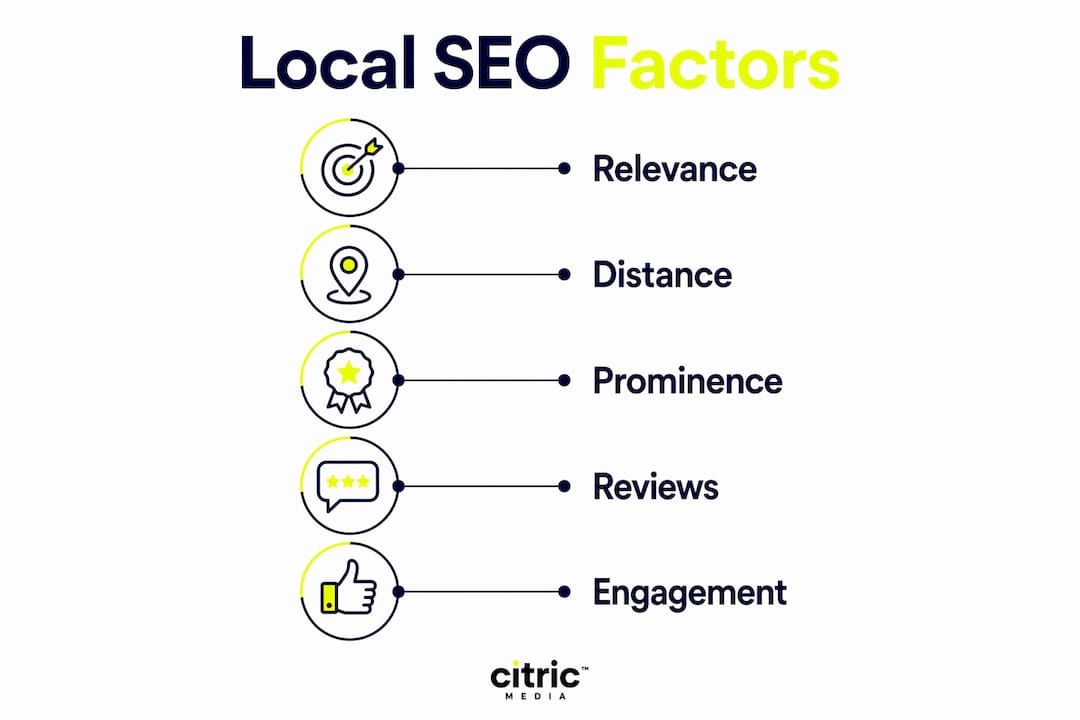
The connection between your profile and local SEO performance is direct and measurable. Google uses three primary factors to rank local results: relevance, distance, and prominence. Your profile influences all three. A complete, accurate profile improves relevance. Your service area or address determines distance. Reviews, photos, posts, and engagement signals build prominence.
| Local Pack ranking factor | How your profile influences it |
|---|---|
| Relevance | Accurate category, services, and business description |
| Distance | Verified address or defined service area |
| Prominence | Volume and quality of reviews, frequency of posts, photo count |
| Trust signals | Owner responses to reviews, up-to-date hours, Q&A replies |
Understanding search engine ranking more broadly helps you see why the profile matters so much. Google rewards businesses that give it accurate, consistent, and regularly updated information. A neglected profile, with outdated hours or no photos, signals to Google that the business may not be active or reliable.
How can UK small businesses optimise their Google Business Profile?
Optimisation is not a one-time task. The most effective approach treats the profile in two tiers: foundational setup first, then ongoing active management. Businesses that complete the basics but then ignore the profile rarely reach the top of the Local Pack.
- Keep information accurate at all times. Update your hours for bank holidays, seasonal changes, or temporary closures. Incorrect hours are one of the fastest ways to lose customer trust.
- Choose the right primary category. This is the most influential single field on your profile. Be specific. “Italian Restaurant” outperforms “Restaurant” for relevant searches.
- Add secondary categories and services. These expand the range of searches your profile can appear for without diluting your primary category signal.
- Request reviews consistently. Ask satisfied customers to leave a review immediately after a positive interaction. Timing matters. A customer who has just received great service is far more likely to write a review than one contacted a week later.
- Respond to every review promptly. Thank customers for positive feedback. Address negative reviews calmly and constructively. Both actions improve your prominence score.
- Publish Google Posts regularly. A post about a current offer, a seasonal service, or a recent project keeps your profile active and gives Google fresh content to index.
- Use a dedicated business email address to manage the profile. A business email rather than a personal account protects administrative access if staff change or accounts are compromised.
The businesses that consistently appear at the top of local results are not necessarily the largest or the longest established. They are the ones that treat their profile as a live marketing channel rather than a directory listing.
Key takeaways
A verified, actively managed Google Business Profile is the most cost-effective local marketing tool available to UK small businesses, and neglecting it cedes ground to competitors who do not.
| Point | Details |
|---|---|
| Free and high-impact | Google Business Profile costs nothing to create and directly influences local search visibility. |
| Verification is critical | Complete verification before editing key details to avoid restarting the process and losing weeks. |
| Reviews drive decisions | 98% of consumers read reviews before visiting a local business, making review management non-negotiable. |
| Local Pack placement | An optimised profile is the primary route into the Local Pack, the most visible local search position. |
| Ongoing management wins | Regular posts, review replies, and accurate information separate top-ranked profiles from ignored ones. |
My honest view on Google Business Profile for UK SMEs
Most UK small businesses I encounter have claimed their Google Business Profile and then largely forgotten about it. They filled in the basics, uploaded one photo from three years ago, and moved on. That approach puts them in the bottom half of local results while competitors who post weekly and reply to every review sit at the top.
The return on time invested here is genuinely difficult to match. A well-managed profile generates calls, directions requests, and website visits without any ongoing spend. Compare that to paid advertising, where the traffic stops the moment the budget does. I am not suggesting you ignore paid channels. Combining a strong profile with a well-structured Google Ads campaign produces results that neither channel achieves alone.
The one habit I would push every UK business owner to adopt is responding to reviews within 24 hours. Not because Google explicitly rewards speed, but because prospective customers read those replies. A thoughtful response to a difficult review tells a watching customer more about your business than ten five-star ratings with no owner engagement.
Use a dedicated business email to manage the profile. I have seen businesses lose access to their profile entirely because the account was tied to a personal email belonging to a former employee. That is an avoidable problem with a five-minute fix.
— Martin
How Citricmedia helps UK businesses get more from their profile
Getting a Google Business Profile live is one thing. Getting it to consistently generate enquiries is another.
Citricmedia works with UK small and medium-sized businesses to set up, verify, and actively manage their Google Business Profile as part of a broader local digital marketing strategy. With over 27 years of experience in performance-driven digital marketing, the team understands what separates a profile that sits idle from one that drives real customer contact. Whether you need help with initial setup, review management, or integrating your profile with a wider digital marketing plan, Citricmedia provides the expertise to make it count.
FAQ
What is Google My Business called now?
Google My Business was rebranded as Google Business Profile in 2026. The tool remains free and offers the same core functionality, now managed directly through Google Search and Maps.
Who is eligible for a Google Business Profile?
Any business with direct customer contact, either at a physical location or within a defined service area, is eligible. Online-only businesses without customer-facing premises do not qualify.
How long does Google Business Profile verification take?
Verification time depends on the method chosen. Postcard verification takes 5–14 days. Phone and email verification, where available, are faster. Video verification is typically processed within a few days.
Does a Google Business Profile help with local SEO?
Yes. A verified and optimised profile is the primary factor in appearing in the Google Local Pack, which sits above organic website results for local searches and drives significant customer contact.
Can I hide my address on Google Business Profile?
Service-area businesses can hide their physical address while still appearing in local search results for their defined coverage area. This protects privacy for home-based or mobile businesses.