General
Microsoft Advertising reaches millions of UK users who never see your Google ads. If you have been putting off Bing advertising because the setup felt unclear or the platform seemed like a poor relation to Google, you are leaving cost-effective leads on the table. UK SMEs consistently underestimate Bing Ads despite lower competition and lower cost-per-click compared to Google. This bing advertising step by step guide walks you through account setup, campaign creation, conversion tracking, and ongoing optimisation so you can start generating measurable results without guesswork.
Table of Contents
- Key takeaways
- Bing advertising step by step: setting up your account
- Creating and optimising your campaigns
- Monitoring, auditing, and optimising for ROI
- Advanced strategies for UK advertisers
- My honest take on Bing Ads for UK businesses
- How Citricmedia can help you get more from Bing
- FAQ
Key takeaways
| Point | Details |
|---|---|
| Set up tracking first | Install the UET tag and define conversion goals before spending a penny on clicks. |
| Import Google Ads carefully | Reduce bids by 20–30% and review targeting after importing to avoid overspending. |
| Audit campaigns regularly | Check location settings, keyword performance, and ad-to-page alignment to cut wasted spend. |
| Use LinkedIn targeting for B2B | Microsoft Advertising’s LinkedIn profile targeting is unique and highly effective for B2B audiences. |
| Monitor meaningful metrics | Conversion rate and cost per conversion matter far more than click volume alone. |
Bing advertising step by step: setting up your account
Before you touch a campaign, the foundations need to be right. A poorly configured account wastes budget from day one and produces data you cannot trust.
1. Create your Microsoft Advertising account. Go to ads.microsoft.com and sign up using a Microsoft account. Select the United Kingdom as your country and set your currency to GBP. Choose your time zone carefully as it affects scheduling and reporting. If you are managing accounts for multiple clients, use user management invitations and account linking rather than sharing login credentials. This keeps everything auditable and secure.
2. Install the Universal Event Tracking tag. The UET tag must be installed on every page of your website. It is separate from your Google Analytics or Google Ads tags and is the backbone of conversion measurement and automated bidding on the platform. Copy the tag from the Microsoft Advertising dashboard and place it in the global header of your site or deploy it via Google Tag Manager.
3. Define your conversion goals. Once the UET tag is live, set up goals tied to real lead actions. Form submissions, phone call clicks, and thank-you page visits are the most common. When a thank-you page is not available, event-based conversion tracking via Google Tag Manager is the more reliable route. Define what a conversion actually means to your business before you configure anything.
4. Import existing Google Ads campaigns. The import tool in Microsoft Advertising replicates your Google Ads structure quickly. However, after importing you should reduce bids by 20 to 30%, revisit location targeting, and reset budgets. The audiences and search behaviours on Bing differ enough that copying everything without adjustment is a reliable way to overspend.
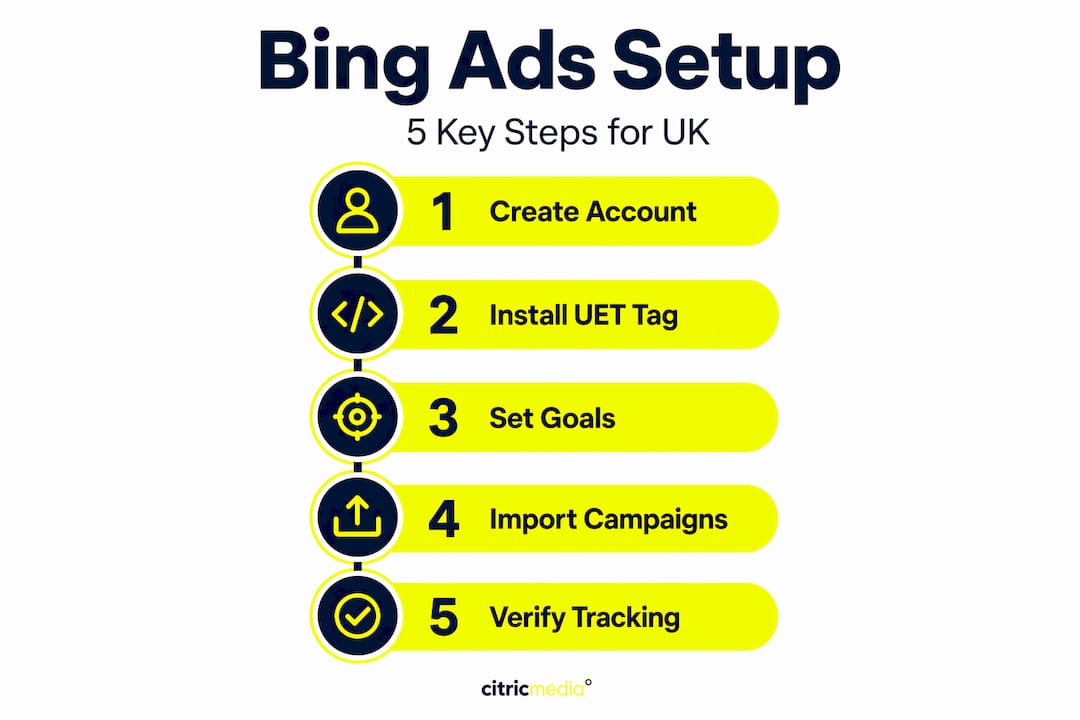
5. Verify your tracking with auto-tagging. Enable auto-tagging in your account settings so UTM parameters are appended dynamically to your destination URLs. Check that your server or CMS does not strip arbitrary URL parameters, as this is a common cause of tracking failure that goes unnoticed until your conversion data is already compromised.
Pro Tip: Conversion tracking setup is the single most common oversight in new Bing Ads accounts. Spend thirty minutes getting it right at the start and you will have data you can actually trust within the first week.
Creating and optimising your campaigns
With your account configured and tracking live, you are ready to build campaigns. This is where your bing advertising guide becomes operational.
Choosing the right campaign type
For most UK businesses running search campaigns, the “Search” campaign type is the starting point. If you sell products, Microsoft Shopping campaigns follow the same logic as Google Shopping but with a separate product feed submission via the Microsoft Merchant Centre. For brand awareness and retargeting, the Audience Network campaign type serves ads across MSN, Outlook, and partner sites.
Keyword research on Microsoft Ads
Use the Keyword Planner inside Microsoft Advertising to build your keyword list. Do not simply paste in your Google Ads keywords. The Bing audience skews slightly older and includes a higher proportion of professional and desktop users, so you may find better performance from longer, more specific search terms. Group keywords tightly by theme, with each ad group covering a narrow topic. Broad match works differently on Bing than on Google, so start with phrase match and exact match to maintain control.

Writing ad copy that converts
Your headlines and descriptions need to do two things at once: match what the searcher typed and communicate a specific benefit. Use the primary keyword in at least one headline. Include a number, a location reference (“covering all of the UK”), or a time-based offer in a second headline. Descriptions should address the searcher’s concern directly rather than list your company’s features.
- Write a minimum of three ad variations per ad group to allow performance testing
- Include a clear call to action in every description (“Request a free quote today”)
- Use sentence case in ad copy, not title case, as it reads more naturally
- Test price-focused copy against benefit-focused copy to identify what resonates with your audience
Bidding strategies and device modifiers
Bidding strategies range from manual CPC to fully automated options, and the right choice depends on where you are in your campaign maturity. Beginners typically benefit from “Maximise Clicks” while gathering initial data. Once you have at least thirty conversions per month, switching to “Target CPA” or “Maximise Conversions” gives the algorithm enough signal to work with. Automated bidding requires sufficient conversion data to function properly. Without it, you are handing the controls to a system flying blind.
Set device bid modifiers based on performance data. Mobile users often convert at lower rates on B2B campaigns, so a negative bid adjustment of 20 to 30% on mobile is worth testing. Conversely, desktop users in certain industries convert at a premium and may justify a positive modifier.
Pro Tip: Ad extensions are free to run and consistently improve click-through rates. Set up sitelink extensions, callout extensions, and a call extension as a baseline. For service businesses, location extensions linking to your Google Business Profile equivalent add credibility at no extra cost.
Monitoring, auditing, and optimising for ROI
Running campaigns without a structured review process is how budgets disappear. A proper bing ad campaign audit covers five areas.
| Audit area | What to check | Why it matters |
|---|---|---|
| Location targeting | Is spend concentrated in the right regions? | Avoids budget leaking to irrelevant geographies |
| Ad vs landing page alignment | Does the page match the ad’s promise? | Misalignment raises bounce rate and lowers Quality Score |
| Keyword performance | Which terms drive conversions vs which drain budget? | Identifies terms to pause, bid up, or move to new ad groups |
| Ad extensions | Are all relevant extensions active and approved? | Extensions increase ad real estate and CTR |
| Conversion tracking | Are goals firing correctly and counting accurately? | Without clean data, all other decisions are unreliable |
A PPC audit reviews all of these elements systematically to reduce wasted spend and improve return on investment. Many UK business owners audit once a quarter, but monthly reviews during the first three months of a new campaign are far more effective.
The metrics that actually matter
Optimising on clicks alone is one of the most common PPC mistakes. The metrics that drive business outcomes are conversion rate, cost per conversion, and the ratio of spend to revenue or lead value. Understanding your conversion rate in advertising and what benchmarks apply in your sector gives you a far more accurate picture than click-through rate alone.
- Click-through rate (CTR): Indicates ad relevance, but high CTR with no conversions is a warning sign
- Conversion rate: The percentage of clicks that result in a meaningful action
- Cost per conversion: Your actual cost to acquire one lead or sale
- Impression share: How often your ads appear versus how often they were eligible to
Negative keywords and wasted spend
Negative keywords prevent your ads from showing on irrelevant searches, and building a thorough negative keyword list is one of the highest-return tasks in PPC management. Review your search term report weekly during the first month. Any term that generated clicks but no conversion, or terms that are clearly off-topic, should be added as negatives at either the campaign or ad group level.
Reporting and dashboard setup
Bing Ads data can be synced to Looker Studio automatically via a connector, pulling impressions, clicks, spend, and conversions into a single dashboard. This is worth setting up early if you are managing multiple campaigns or reporting to stakeholders. Refer to advertising performance metrics guidance to decide which data points belong in your reporting view versus which are internal diagnostic metrics.
Advanced strategies for UK advertisers
Once your core campaigns are performing consistently, these approaches extend your reach and improve efficiency.
- Remarketing via Microsoft Ads: Search remarketing adjusts your bids for users who have already visited your website, prioritising warm audiences who are more likely to convert. Dynamic remarketing goes further by serving ads featuring the specific products or pages a visitor viewed. Both require the UET tag to be properly installed.
- LinkedIn profile targeting: This is the feature that genuinely differentiates Microsoft Advertising from Google. You can layer LinkedIn demographic data, including job title, industry, and company size, onto your search and audience campaigns. For B2B businesses in the UK, this narrows your spend to decision-makers rather than researchers or job seekers.
- Automated bidding with guardrails: When you move to Target CPA or Maximise Conversions, set a maximum CPC cap to prevent the algorithm from making expensive outlier bids. Check automated bidding performance weekly for the first month before extending your review cycle.
- Scaling with campaign experiments: Microsoft Advertising has a campaign experiment feature that lets you test bid strategies, ad copy variations, or landing pages against a control, splitting traffic 50/50. Use this before making permanent changes to your highest-spending campaigns.
For practical online advertising examples relevant to UK SMEs, it is worth reviewing how businesses in similar sectors have structured their paid search activity before committing to a full-scale campaign build.
My honest take on Bing Ads for UK businesses
I have managed Microsoft Advertising campaigns alongside Google Ads for a long time, and one thing I keep seeing is UK businesses either ignoring Bing entirely or treating it as a copy-paste extension of their Google account. Both approaches underperform badly.
The businesses that get the most from Bing are the ones that treat it as a distinct channel with its own audience profile. The Bing user base in the UK is genuinely different. Professional demographics, older decision-makers, and a higher proportion of desktop sessions mean that certain industries, particularly professional services, finance, and B2B sectors, see conversion rates on Bing that surprise people who expected it to be a second-tier platform.
What I find works in practice is building Bing campaigns with fresh ad copy rather than importing everything wholesale, and setting more conservative initial bids than you think you need. The auction is less aggressive than Google, and you rarely need to overbid to achieve strong positioning. Patience in the first four to six weeks pays off considerably.
The one thing I would push back on is the assumption that you need scale to justify Bing Ads. I have seen campaigns with modest monthly budgets generate a meaningful proportion of a business’s total online leads, purely because the competition on Bing in certain keyword categories is so much thinner. Do not wait until your Google Ads account is perfect before exploring this channel.
— Martin
How Citricmedia can help you get more from Bing
If this bing advertising guide has clarified the opportunity but the execution still feels like a significant lift, Citricmedia’s team of paid search specialists can manage the entire process for you. With over 27 years of experience running performance-driven campaigns for UK SMEs, Citricmedia handles everything from account setup and UET tracking to ongoing optimisation and monthly reporting. Whether you want to explore a step-by-step digital marketing approach or need a data-driven lead generation strategy built around your specific sector, the team delivers measurable outcomes rather than activity reports. Get in touch to discuss what your Bing Ads campaigns could realistically achieve.
FAQ
What is the first step in setting up Bing Ads?
Create a Microsoft Advertising account at ads.microsoft.com, set your country to the United Kingdom and currency to GBP, then install the UET tracking tag on your website before creating any campaigns.
Can I import my Google Ads campaigns into Bing?
Yes, Microsoft Advertising has a built-in import tool, but you should reduce bids by 20 to 30% and review targeting and budgets after importing, as the Bing audience and auction dynamics differ from Google.
How do I track conversions in Microsoft Advertising?
Install the UET tag on every page of your website and define conversion goals based on lead actions such as form submissions or call clicks. Event-based tracking via Google Tag Manager works well when thank-you pages are not available.
What bidding strategy should I start with on Bing?
Beginners should use Maximise Clicks to gather initial data. Once you have at least thirty conversions per month, automated strategies such as Target CPA become reliable enough to use without manual oversight.
Is Bing Ads worth it for small UK businesses?
Yes. Lower competition and lower cost-per-click compared to Google mean that UK SMEs in professional services, B2B, and finance sectors often see strong conversion rates at a lower cost per lead than they expect.