Social Media
Paid social campaigns are structured advertising efforts on platforms like Meta (Facebook and Instagram) that generate leads and sales by targeting defined audiences with tested creative and reliable tracking. For UK SMEs looking to grow, knowing how to create paid social campaigns correctly from the start separates profitable accounts from wasted budget. The core tools you need are Meta Pixel, Conversions API, and a structured creative testing framework. Get these three elements working together and you have the foundation for real, measurable results from day one.
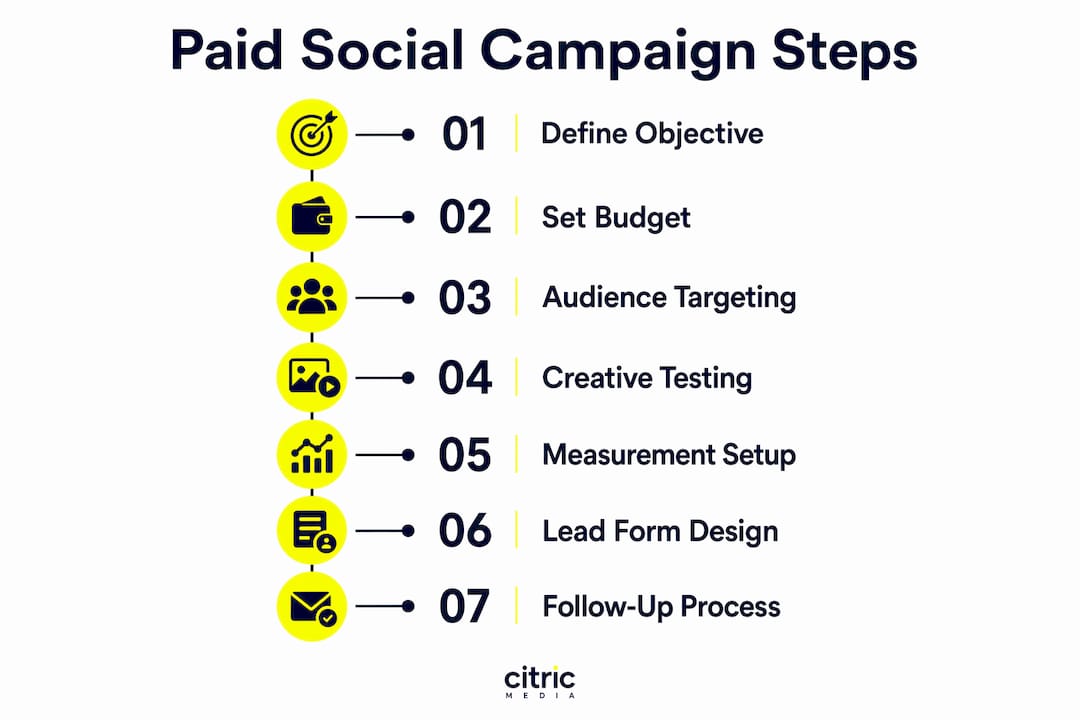
How to create paid social campaigns: objectives and structure
The first decision in any Meta campaign is choosing the right objective. For UK SMEs, the three most relevant are Sales, Leads, and Awareness. Sales campaigns optimise for purchase events and suit e-commerce or direct-response offers. Leads campaigns optimise for form fills or calls and suit service businesses, trades, and professional firms. Awareness campaigns build reach but rarely generate direct revenue, so treat them as supplementary rather than primary.
Campaign structure matters as much as objective selection. Mixing cold and warm audiences in the same Campaign Budget Optimisation (CBO) causes Meta’s algorithm to over-allocate spend toward warm audiences, which degrades your prospecting signals over time. Keep prospecting and retargeting in separate campaigns from the start. This gives you cleaner data, better control, and a more accurate read on what is actually acquiring new customers.
Meta’s Advantage+ Shopping and Audience campaigns automate placement and audience targeting, and they often outperform manual setups once your account has sufficient conversion data. For most UK SMEs starting out, a manual campaign with broad targeting is the right entry point. Once you have 50 or more conversions per week, Advantage+ becomes worth testing seriously.
Budget sizing is where many SMEs make their first mistake. Daily budgets should be 3 to 5 times your target CPA to give Meta’s algorithm enough data to exit the learning phase efficiently. If your target cost per lead is £30, your daily budget should be at least £90 to £150. Underfunding a campaign keeps it stuck in learning indefinitely and produces unreliable results.
- Set one clear objective per campaign, matched to your business goal
- Separate prospecting and retargeting into distinct campaigns
- Start with broad targeting before layering in Advantage+ automation
- Budget at 3 to 5 times your target CPA daily
Pro Tip: Never launch a new campaign with a budget below your target CPA. Meta needs spending data to learn, and a £10 daily budget against a £50 CPA target will produce nothing useful.
How to set up audience targeting and creative testing
Audience targeting on Meta in 2026 works differently from what many UK SMEs expect. Broad targeting with minimal restrictions consistently outperforms layered interest stacks because Meta’s algorithm identifies the best converters based on behavioural signals rather than declared interests. Stacking five interest layers feels precise but actually constrains the algorithm and raises your cost per acquisition. Start broad, let the system learn, and only narrow if the data tells you to.

Advantage+ Audiences takes this further by automatically expanding your defined audience when it finds better converters outside your original parameters. For UK SMEs with smaller audience pools, this is particularly useful because it prevents your ads from burning out a limited retargeting list too quickly. Custom audiences built from your CRM data or website visitors remain valuable as seeds for lookalike audiences, but they work best as inputs rather than strict targeting constraints.
Creative testing is where most campaigns win or lose. Follow this process to structure your tests properly:
- Isolate one variable per test. Change the hook, the format, the offer, or the CTA. Never change two at once or you cannot attribute the result.
- Run each test for a minimum of seven days. Short windows produce statistically unreliable data, especially in smaller UK markets.
- Wait for at least 100 conversions per variant before drawing conclusions. Anything less is noise, not signal.
- Use Meta’s built-in A/B testing tool rather than manually duplicating ad sets. It controls for audience overlap and timing differences.
- Document every test result in a shared log. Patterns across tests reveal what your specific audience responds to, and that knowledge compounds over time.
Ad format selection should follow your creative assets. Single images work for direct offers with a clear value proposition. Video performs well for demonstrating a product or building trust. Carousel ads suit multi-product showcases or step-by-step explanations. Dynamic creative lets Meta mix and match headlines, images, and copy variations automatically, which is useful when you have multiple assets but limited testing bandwidth.
For online advertising examples that show what works across formats for UK businesses, reviewing real-world creative approaches before building your own assets saves significant time.
Pro Tip: The hook is the most important element in any ad. Test your opening line or first three seconds of video before testing anything else. A weak hook kills performance regardless of how strong the rest of the ad is.
What measurement and tracking setups do you need?
Accurate measurement is the difference between a campaign you can improve and one you are guessing at. Meta recommends dual tracking using Pixel and Conversions API together with event deduplication, because browser-side signals from Pixel are increasingly blocked by iOS restrictions and ad blockers. Conversions API sends server-side signals directly from your website or CRM, capturing conversions that Pixel misses entirely.
Event deduplication is non-negotiable when running both. Verify your setup by checking that each conversion event is counted from two sources but reported as a single event in Meta Events Manager. Without deduplication, your reported conversion volume inflates and your optimisation signals become corrupted.
| Tracking element | Purpose | Common pitfall |
|---|---|---|
| Meta Pixel | Browser-side conversion tracking | Blocked by iOS and ad blockers |
| Conversions API | Server-side conversion tracking | Requires developer setup or partner integration |
| Event deduplication | Prevents double-counting | Often skipped, inflating reported conversions |
| CRM event feedback | Sends closed-won data back to Meta | Rarely implemented by UK SMEs |
| UTM parameters | External attribution in Google Analytics | Inconsistent naming conventions |
Sending closed-won CRM events back to Meta via Conversions API is one of the highest-leverage actions available to UK SMEs running lead generation campaigns. Advertisers who implement this see 15 to 30% lower cost per lead with higher win rates, because Meta optimises toward actual customers rather than form fills. Most SMEs never do this, which means their campaigns keep generating cheap but unconverted leads.
UTM parameters capture source, medium, campaign, and content data for unified measurement in Google Analytics 4 or any external analytics tool. Use a consistent naming convention across every ad and never rely solely on Ads Manager ROAS. Platform-reported figures always overcount due to attribution window differences, and comparing them directly to revenue data from your CRM will almost always reveal a gap.
The default attribution window in Meta is seven-day click and one-day view. This is appropriate for most UK SME campaigns. Shortening it to one-day click gives a more conservative read and is worth testing if your sales cycle is short.
Pro Tip: Set up your UTM naming convention before you launch a single ad. Retroactively tagging campaigns is painful and produces gaps in your data that make month-on-month comparisons unreliable.
How to design lead forms and follow-up processes that convert
Lead form design directly controls how many people complete your form and how qualified they are when they do. Short forms with 3 to 5 fields significantly increase completion rates. Each additional field beyond five reduces completion by 5 to 15%. The right fields are name, email, phone number, and one qualifying question that filters out poor-fit enquiries before they reach your sales team.
Meta’s native lead forms pre-fill name, email, and phone from the user’s profile, which removes the friction of manual entry and lifts completion rates noticeably. Enable the “higher intent” confirmation step, which adds a review screen before submission. This small addition reduces junk submissions from accidental taps, particularly on mobile.
Conditional qualifying questions are underused by most UK SMEs. A question like “What is your monthly budget?” or “How many employees does your business have?” routes high-value leads differently from low-value ones, and it gives your sales team context before they make the first call.
- Use 3 to 5 fields maximum, with pre-fill enabled
- Add one qualifying question relevant to your sales process
- Enable the higher intent confirmation step to reduce accidental submissions
- Connect your form directly to your CRM via a native integration or Zapier
Speed-to-lead is the operational factor that most campaigns ignore. Leads contacted within five minutes are 21 times more likely to convert than those contacted after 30 minutes. Automated CRM routing with lead delivery within 60 seconds is the standard to aim for. If your team cannot respond within five minutes during business hours, an automated SMS or email acknowledgement buys goodwill and keeps the lead warm until a human follows up. For deeper thinking on lead nurturing strategies that work alongside paid social, the operational side of conversion deserves as much attention as the ad itself.
Pro Tip: Test a two-question lead form against a five-question form. The shorter version will almost always generate more volume. The longer version may generate fewer but better-qualified leads. The right answer depends on your sales team’s capacity, not on a universal rule.
What are the most common mistakes in paid social campaigns?
The learning phase is the most fragile period in any Meta campaign. Pausing an ad set or making significant edits during this phase resets the learning counter and forces the algorithm to start again. Budget changes above 20% in a single edit also trigger a reset. Make incremental budget increases of no more than 20% every three to five days once a campaign is performing.
Creative fatigue is a persistent problem for UK SMEs because audience pools are smaller than in the US market. UK-specific campaigns require more frequent creative refresh cycles due to tighter retargeting frequency caps and faster audience saturation. Monitor frequency on retargeting campaigns closely. When frequency exceeds three to four impressions per person per week, performance typically drops and cost per result rises.
“Most paid social success depends more on continuous creative testing and robust measurement systems than on narrow targeting.” This is the single most important reframe for UK SMEs who spend weeks building complex audience structures instead of testing new creative.
Bid caps and cost controls are useful once you have established a reliable CPA baseline, but applying them too early starves the algorithm of the data it needs to optimise. Use automatic bidding during the learning phase, then introduce cost controls once you have at least 50 conversions per week. Monitoring conversion quality beyond form fill volume, by tracking downstream metrics like sales qualified leads and closed revenue, is what separates campaigns that look good in Ads Manager from ones that actually grow your business.
Key takeaways
Effective paid social campaigns for UK SMEs require aligned objectives, separate prospecting and retargeting structures, dual tracking with Pixel and Conversions API, short lead forms, and fast follow-up to convert leads into revenue.
| Point | Details |
|---|---|
| Separate campaign structures | Keep prospecting and retargeting in distinct campaigns to prevent budget over-allocation to warm audiences. |
| Dual tracking setup | Use Pixel and Conversions API together with event deduplication for accurate, complete conversion measurement. |
| Creative testing discipline | Isolate one variable per test, run for seven days minimum, and require 100 conversions before concluding. |
| Lead form length | Limit forms to 3 to 5 fields with one qualifying question to maximise completion and lead quality. |
| Speed-to-lead | Contact new leads within five minutes. Automated CRM routing within 60 seconds is the operational benchmark. |
My honest view on paid social for UK SMEs
Having worked on Meta campaigns for UK businesses across a wide range of sectors, the pattern I see most consistently is this: businesses over-invest in audience refinement and under-invest in creative and measurement. They spend days building custom audience stacks and almost no time testing whether their ad actually stops the scroll.
The UK market adds its own layer of complexity. ICO compliance, ASA advertising standards, and smaller audience pools mean your creative needs to refresh faster and your retargeting needs tighter frequency management than equivalent US campaigns. These are not optional considerations. An ad that runs afoul of ASA guidelines can be pulled, and a retargeting audience of 10,000 people saturates in days, not weeks.
What I have found works consistently is treating paid social as a system rather than a set of individual ads. The ad drives the click. The form captures the lead. The CRM routes it instantly. The follow-up converts it. Each stage needs to be measured and optimised independently. When one stage breaks, the whole system underperforms, and the temptation is to blame the ad when the real problem is a 48-hour response time.
The businesses I see grow fastest on paid social are not the ones with the biggest budgets. They are the ones who test relentlessly, measure honestly, and follow up immediately.
— Martin
How Citricmedia can help you run paid social campaigns
Running paid social campaigns that consistently generate quality leads and sales requires the right structure, tracking, and creative process working together from day one.
Citricmedia has over 27 years of experience managing performance-driven digital campaigns for UK SMEs, including Meta advertising across Facebook and Instagram. From campaign architecture and Pixel setup to creative testing and CRM integration, the team handles the technical and strategic work so you can focus on converting the leads that come in. If you are ready to build a paid social strategy that generates measurable results, or want to improve an existing account that is not performing, get in touch with Citricmedia for a tailored assessment of your current setup.
FAQ
What is the best campaign objective for UK SME lead generation?
The Leads objective is the most direct choice for UK service businesses, as it optimises for form completions or calls. Sales campaigns suit e-commerce or direct-purchase offers where a clear transaction event can be tracked.
How much should a UK SME budget for Meta ads?
Set your daily budget at 3 to 5 times your target cost per lead or sale. A £30 target CPA requires at least £90 to £150 per day to give Meta’s algorithm enough data to exit the learning phase.
Why should I use both Pixel and Conversions API?
Dual tracking captures both browser-side and server-side conversion signals, compensating for iOS restrictions and ad blockers that block Pixel alone. Together, they give Meta more accurate data to optimise your campaigns.
How many fields should a Meta lead form have?
Keep forms to 3 to 5 fields. Each field beyond five reduces completion rates by 5 to 15%, so include only name, email, phone, and one qualifying question relevant to your sales process.
How quickly should I follow up with leads from Meta ads?
Contact leads within five minutes of submission. Leads reached within this window are 21 times more likely to convert than those contacted after 30 minutes, making CRM automation a necessity rather than a nice-to-have.