
Bing Marketing
Bing advertising is Microsoft’s pay-per-click platform that places paid search and native display ads across the Microsoft Search Network, reaching users on Bing, Yahoo, AOL, and DuckDuckGo partner sites. Formally known as Microsoft Advertising, it gives UK businesses access to a distinct audience of older, higher-income professionals who are largely absent from Google’s ecosystem. For marketing managers and business owners focused on lead generation, that distinction matters more than most realise. This guide covers how the platform works, who it reaches, what it costs relative to Google Ads, and how to get the most from it.
What is Bing advertising and who does it actually reach?
Microsoft Advertising reaches a significantly older, professional demographic compared with Google Ads. The typical Bing user skews towards the 35 to 55-plus age bracket, holds a higher household income, and is far more likely to be in a professional or managerial role. That is not a coincidence. Bing is the default search engine on Windows devices and within Microsoft Edge, which means it captures the daily search behaviour of office workers, executives, and IT decision-makers who never bother to switch browsers.
The numbers that follow from this are striking. 49% of Bing users are decision-makers, compared with 24% on Google. That is roughly double the concentration of purchase-authorising professionals in a single audience pool. For B2B marketers in particular, this changes the economics of paid search entirely. You are not paying to reach a broad population and hoping a fraction are relevant. You are starting from a base where nearly half the audience has genuine buying authority.
Income profile reinforces this further. Around 36% of Microsoft Search Network users fall into the top quartile of household income. This matters for B2C advertisers too, especially those selling premium products or services where disposable income and willingness to spend are qualifying factors. Combine that with the Microsoft Audience Network, which places native ads across MSN, Outlook, and Microsoft Edge, and you have a platform that touches professionals throughout their working day, not just during a search session.
“The Microsoft ecosystem does not just reach professionals at the moment of search. It surrounds them across email, news, and productivity tools, creating multiple touchpoints that Google simply cannot replicate.”
For UK businesses exploring B2B lead generation strategies, Bing advertising offers a channel where audience quality is structurally higher from the outset.
How does Bing advertising work in practice?
The campaign structure in Microsoft Advertising mirrors Google Ads closely, with campaigns, ad groups, keywords, and bids organised in the same hierarchy. This familiarity is deliberate. Campaigns can be imported directly from Google Ads with minimal effort, which removes the barrier of rebuilding everything from scratch. That said, importing and leaving campaigns unchanged is one of the most common mistakes advertisers make, and we will address that in the optimisation section.
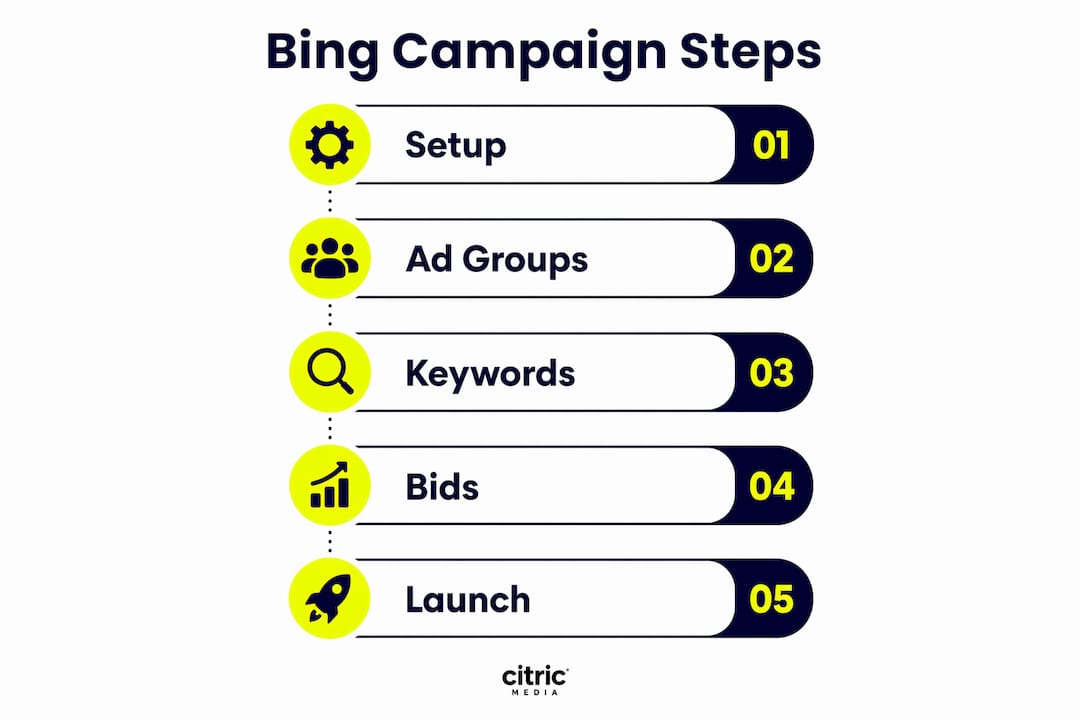
Ad formats available on Microsoft Advertising
Microsoft Advertising supports a range of ad formats suited to different campaign objectives:
- Responsive search ads: The standard text ad format where Microsoft’s AI tests headline and description combinations to find the best-performing variants.
- Dynamic search ads: Automatically generated ads based on your website content, useful for large catalogues or service pages.
- Microsoft Shopping ads: Product listing ads that appear in Bing’s shopping tab, directly comparable to Google Shopping.
- Native display ads: Image-led ads served across the Microsoft Audience Network on MSN, Outlook, and Edge.
- Copilot ad placements: An emerging format where ads appear inside AI-generated answers within Bing’s Copilot assistant, offering visibility at the point of AI-assisted decision-making.
Targeting options that set Bing apart
The targeting capabilities in Microsoft Advertising go beyond standard keyword and location targeting. LinkedIn profile targeting allows advertisers to layer professional attributes directly onto search campaigns, including job title, seniority level, company size, and industry sector. No other search platform offers this natively. For a UK professional services firm targeting finance directors at mid-market companies, this is a material advantage.

Microsoft 365 signals add another layer. Because Microsoft owns the productivity suite used by millions of UK businesses, it has first-party data on professional behaviour that informs in-market audience segments. Smart bidding strategies equivalent to Google’s Target CPA and Target ROAS are available, and the Microsoft Advertising Editor tool supports bulk campaign management at scale, making it practical for agencies and in-house teams managing large accounts.
Pro Tip: Use the campaign import tool to get started quickly, but immediately review match types, bid adjustments, and LinkedIn audience layers before going live. A direct copy of your Google Ads campaigns will underperform because Bing’s search patterns and audience signals are different.
Why use Bing advertising alongside Google Ads?
The case for Microsoft Advertising is not that it replaces Google Ads. It is that it reaches people Google cannot, at a lower cost, with better audience quality in specific segments. Those three factors together make it a strong complement rather than a competitor to your existing paid search activity.
On cost, the advantage is consistent. Microsoft Ads typically deliver 20 to 40% lower cost-per-click than Google Ads for equivalent keywords across many verticals. In highly competitive UK sectors such as financial services, legal, and recruitment, where Google CPCs can reach tens of pounds per click, that saving is significant. The conversion rates are comparable or, in some B2B categories, superior, because the audience is more qualified from the start.
Here is a direct comparison of the two platforms across the factors that matter most to UK marketers:
| Factor | Microsoft Advertising | Google Ads |
|---|---|---|
| Average CPC | 20 to 40% lower | Higher, especially in competitive sectors |
| Decision-maker audience | 49% of users | 24% of users |
| LinkedIn targeting | Available natively | Not available |
| Search network reach | Bing, Yahoo, AOL, DuckDuckGo | Google Search and Search Partners |
| AI ad placements | Copilot integration | AI Overviews (limited ad integration) |
| Campaign import | From Google Ads directly | N/A |
The numbered reasons UK businesses should treat Bing advertising as a priority rather than an afterthought:
- You reach a professional audience that Google’s demographic skew does not deliver at the same concentration.
- Lower CPCs mean your budget goes further, particularly valuable for SMEs with fixed monthly ad spend.
- LinkedIn targeting lets you qualify audiences by professional role before they even click.
- The Microsoft ecosystem, including Outlook, Teams, and Edge, creates multiple touchpoints across the working day.
- Copilot ad placements position your brand inside AI-generated answers, an emerging format with distinct paid search opportunities that Google has not yet matched.
The attribution point is worth addressing directly. Many businesses undervalue Bing because last-click attribution models assign credit to Google when a user searches on both platforms before converting. Multi-touch attribution or incrementality testing consistently reveals that Bing contributes more to the conversion path than last-click data suggests.
How to optimise Bing ads for better performance
The single biggest mistake UK advertisers make with Microsoft Advertising is managing it as a Google-lite strategy without using the platform’s unique features. Importing campaigns is a starting point, not a finished strategy. Bing’s audience, search behaviour, and data signals are different enough to warrant a distinct approach.
Effective optimisation on Microsoft Advertising involves several specific actions:
- Activate LinkedIn audience targeting: Layer job title, seniority, and company size onto your highest-value ad groups. This narrows reach but dramatically improves lead quality, particularly for B2B campaigns.
- Build a Bing-specific negative keyword list: Search query reports on Bing often surface different irrelevant terms than Google. Review them separately and build a negative keyword list that reflects Bing’s actual search patterns.
- Test Copilot placements: Opt into Copilot ad placements and monitor performance separately. These are early-stage but represent a genuine first-mover opportunity as AI-assisted search grows.
- Use smart bidding with caution initially: Target CPA and Target ROAS bidding work well once campaigns have sufficient conversion data. In the early weeks, manual or enhanced CPC bidding gives you more control while the algorithm learns.
- Review device and demographic bid adjustments: Bing’s professional audience over-indexes on desktop. Adjust bids accordingly rather than applying the same device multipliers you use on Google.
Pro Tip: Run a 30-day incrementality test by pausing Bing campaigns for a subset of your audience and comparing conversion volume against the control group. This gives you a clear picture of Bing’s true contribution beyond what last-click attribution reports.
For a practical walkthrough of setting up campaigns from scratch, the Bing advertising step-by-step guide from Citricmedia covers the full process tailored to UK businesses.
Key takeaways
Microsoft Advertising delivers a structurally superior B2B audience at a lower cost than Google Ads, making it an essential complement to any UK paid search strategy.
| Point | Details |
|---|---|
| Audience quality | 49% of Bing users are decision-makers, nearly double the proportion on Google. |
| Cost efficiency | CPCs run 20 to 40% lower than Google Ads, with comparable conversion rates. |
| LinkedIn targeting | Job title, seniority, and company size targeting is available natively on Microsoft Advertising. |
| Avoid the Google-lite trap | Importing campaigns without adapting strategy to Bing’s unique signals limits performance significantly. |
| Copilot opportunity | AI-powered ad placements inside Bing’s Copilot assistant represent an emerging first-mover advantage. |
Why Bing advertising deserves more than a footnote in your media plan
I have reviewed hundreds of UK business ad accounts over the years, and the pattern is almost always the same. Bing is either absent entirely or running a neglected import of the Google Ads account, with no LinkedIn targeting activated, no Bing-specific negative keywords, and bid strategies set to whatever Google recommended. The result is mediocre performance that confirms the advertiser’s low expectations, and the budget gets cut.
That is a self-fulfilling outcome, and it frustrates me because the underlying platform is genuinely strong. The Microsoft ecosystem targeting is unlike anything else in paid search. When you can layer LinkedIn seniority data onto a search campaign and serve ads specifically to finance directors searching for your service category, you are doing something Google simply cannot offer. That is not a minor feature. For B2B service businesses in the UK, it can be the difference between a campaign that generates qualified leads and one that generates volume with poor close rates.
My practical advice: start Bing campaigns running in parallel with Google Ads rather than treating them as a future project. Even a modest budget of £500 to £1,000 per month will generate enough data within six to eight weeks to make a proper assessment. Use that period to test LinkedIn targeting, review search query reports, and measure incrementality. You will almost certainly find that Bing contributes more than your attribution model currently credits it for. The online advertising examples from UK SMEs that have done this consistently show the same result: Bing adds reach and lead quality that Google alone cannot deliver.
— Martin
How Citricmedia can help with Bing advertising
Citricmedia has managed Microsoft Advertising campaigns for UK businesses across B2B and B2C sectors for over 27 years, with a particular focus on generating high-quality leads and enquiries rather than vanity metrics. Our approach goes well beyond importing Google Ads campaigns. We build Bing strategies that use LinkedIn targeting, Microsoft Audience Network placements, and smart bidding configurations specific to each client’s sector and audience.
If you are ready to explore what Microsoft Advertising can deliver for your business, our Bing advertising setup guide is the clearest starting point. It covers campaign structure, targeting configuration, and ongoing management in plain language, designed specifically for UK businesses. Get in touch with the Citricmedia team to discuss how we can build a Bing strategy that complements your existing paid search activity and drives measurable growth.
FAQ
What is Bing advertising in simple terms?
Bing advertising, formally called Microsoft Advertising, is a pay-per-click platform that places ads across Bing, Yahoo, AOL, and DuckDuckGo. Advertisers pay when users click their ads, with targeting options including keywords, location, demographics, and LinkedIn professional attributes.
How does Bing advertising differ from Google Ads?
Microsoft Advertising reaches a more professional and older demographic, with 49% of users being business decision-makers compared to 24% on Google. It also offers LinkedIn profile targeting and typically delivers 20 to 40% lower cost-per-click than Google Ads for comparable keywords.
Is Bing advertising worth it for small UK businesses?
For UK SMEs, particularly those in B2B sectors or selling to higher-income consumers, Bing advertising offers strong value. Lower CPCs and a more qualified audience mean budgets stretch further, and the platform’s professional demographic often produces better lead quality than Google Ads alone.
Can I use my Google Ads campaigns on Bing?
Microsoft Advertising allows direct campaign import from Google Ads, making setup straightforward. However, simply importing without adapting targeting, negative keywords, and bid strategies to Bing’s unique audience and search patterns will limit performance significantly.
What is the Microsoft Audience Network?
The Microsoft Audience Network is the native display arm of Microsoft Advertising, serving image-led ads across MSN, Outlook, and Microsoft Edge. It extends reach beyond search results and places ads in front of professionals throughout their working day across Microsoft’s content properties.